APIs & webhooks
Request automation from external systems and follow traceable events and results.
Scoped access · Event delivery CuvenaScript Manager by Arynox
YOUR AUTOMATION. ONE CONNECTED WORLD.
A private workspace for teams and their scripts.
Explore the live Atlas demo ↗Interactive · Fictional data · No sign-inManage PowerShell, Bash and Python scripts. Schedule automation, control access and follow results across Windows and Linux environments.
CuvenaVia your execution poolTHERE’S MORE TO AUTOMATION THAN RUNNING A SCRIPT.
A script is the beginning. Cuvena brings the version, account, target, schedule and outcome into one connected workspace.
MEET YOUR INFRASTRUCTURE ATLAS
Explore your agents, pools and target servers in one connected map. Select a node, follow its relationships and switch between 2D and 3D.
Try the live Atlas demo ↗Interactive demo · Fictional data · No sign-in needed See it in the product film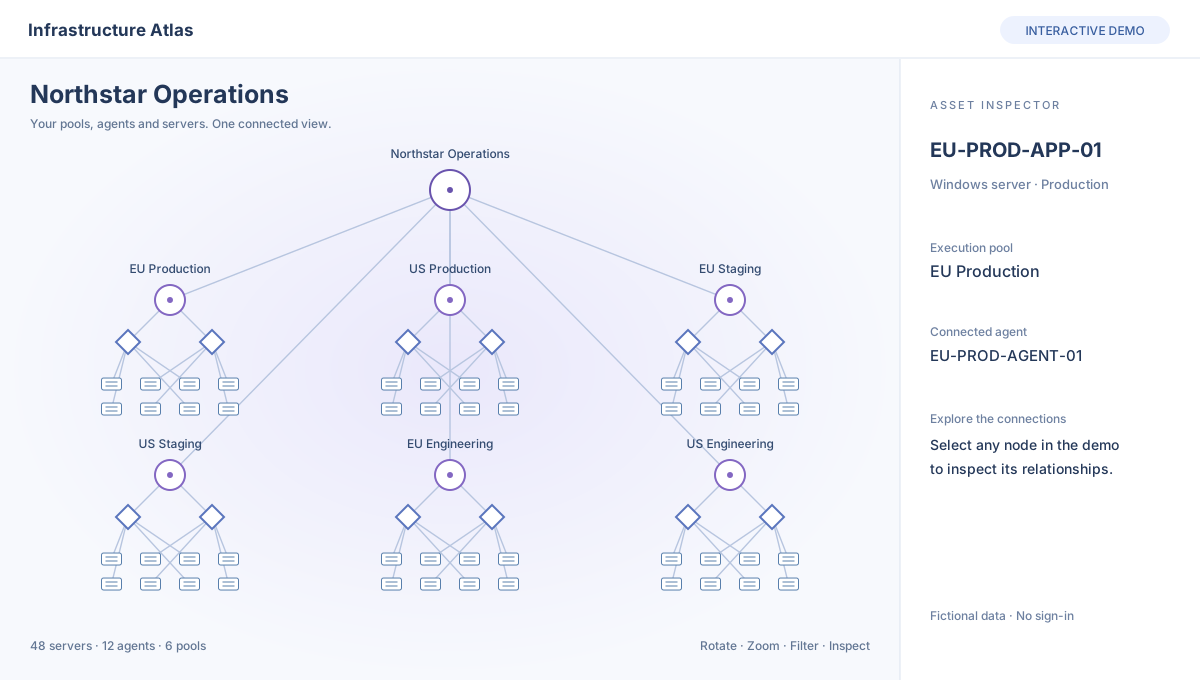 Open the live Atlas demo ↗
THE RIGHT SERVER FOR THIS RUN
Group interchangeable servers. Check connectivity and sign-in. Select one healthy target using your chosen policy—and see exactly why it was selected.
After lost execution confirmation, verify the outcome before retrying. Server groups do not guarantee availability or duplicate-free external side effects.
The fastest healthy response among these eligible candidates. One business execution.
A FLOW THAT MAKES SENSE
Give each step a place. Keep its context with it. Build repeatable work your team can understand.
DEVELOP WITH CONTEXT
Keep script versions, define typed inputs and connect repository imports. Give your team a clear published version to use.
Explore the platform ↗Illustrative dashboard with fictional data.
CLEAR RESULTS. CLEAR NEXT STEPS.
Follow live work, inspect execution history and investigate incidents with the affected resources in view. Keep manual incident status separate from the actual execution outcome.
Explore monitoring & diagnostics ↗MAKE IT PART OF YOUR WORLD
Bring automation into existing processes, and make approved actions easier for others to request.
Request automation from external systems and follow traceable events and results.
Scoped access · Event deliveryReview imports, link script versions to commits and manage controlled promotion.
Version context · Reviewed changesPublish approved automation with simple inputs, access rules and understandable results.
Parameter forms · ApprovalsSEE CUVENA IN MOTION
From the first script to a traceable result. See the complete journey, then explore Atlas for yourself.
Move around the map. Select an agent or server. Follow the connections.
Animated product walkthrough using illustrative data. Read the transcript
PUT IT TO WORK
CONTROL BUILT INTO THE JOURNEY
Scoped permissions, separate account roles, optional approvals and an audit trail.
Supported platforms and connection technologies—not customer or partnership endorsements.
SUPPORT WITH ACCOUNTABILITY
Cuvena support workspaces let authorised platform staff investigate an organisation without asking for a customer's password or replacing their login.
Standard access requires customer approval by default and starts read-only. Platform owners and separately authorised privileged support staff can investigate without an individual customer approval. Platform owners are not required to use an authenticator for support access. Both modes identify the staff member and record activity in the organisation and platform audit logs.
Read how support access worksACCOUNT ACCESS
Platform owners can assign detailed Admin roles to administrators and support staff. Optional authenticator setup includes a scannable QR code and single-use recovery codes. Enabled authenticator protection is enforced at sign-in.
Read the access and recovery guideYOUR NEXT CHAPTER IN AUTOMATION
Start with a demo. Bring your environment into the conversation.